

Databricks is an API Key based integration and does not require the setup of an app.
Required Credentials of a Linked Account
To successfully connect with the Databricks integration, a Linked Account or an end-user will need to provide the following to connect:- API Key (Personal Access Token)
- Base URL
To understand how a Linked Account can get the above mentioned credentials, refer below.
Getting Credentials of Databricks
To acquire the required credentials and connect a Linked Account, please follow the steps mentioned below:- Log in to your Databricks workspace at your workspace URL (e.g.,
https://<workspace-id>.azuredatabricks.net). - Click on your profile icon in the top right corner and select
Settings.
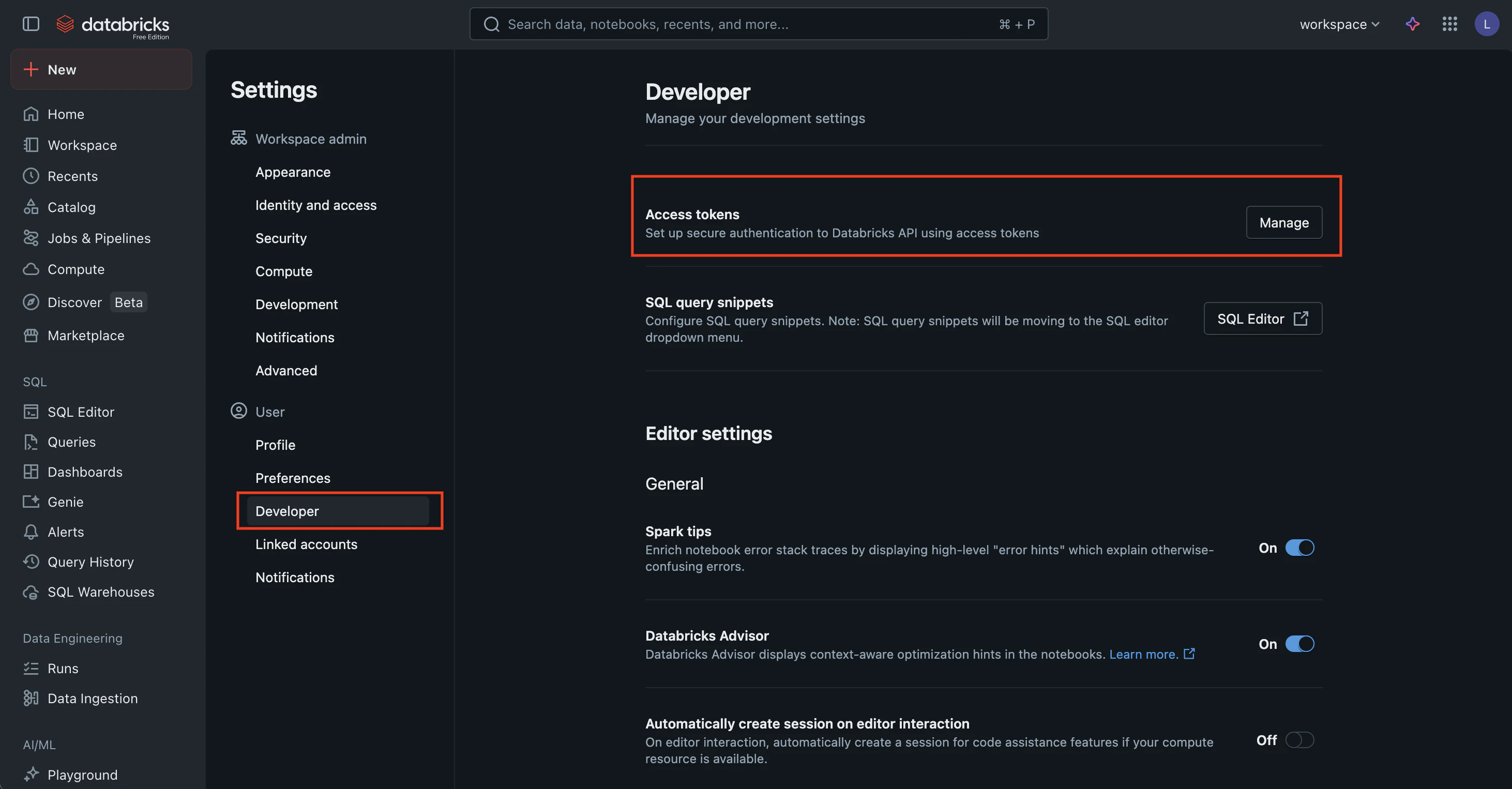
- Navigate to
Developerin the left menu > Click on theManagebutton next to Access tokens as shown above. - Click
Generate new token.
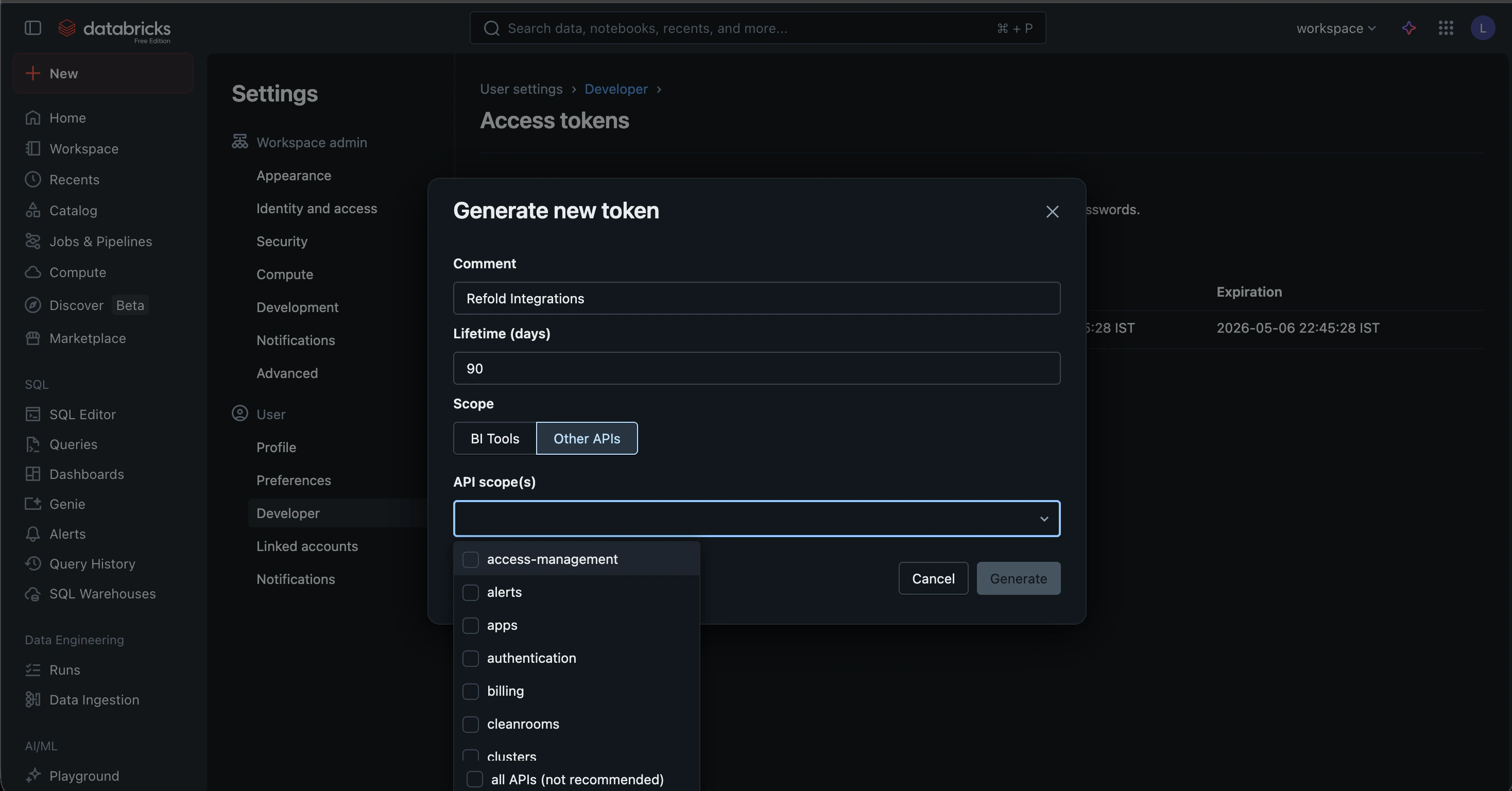
- Provide a Comment (e.g., “Refold Integration”) and set a Lifetime for the token. Select any particular scopes as should be accessible by the Refold Databricks connector. Click
Generate. - Copy the token displayed on the screen. This is your API Key.
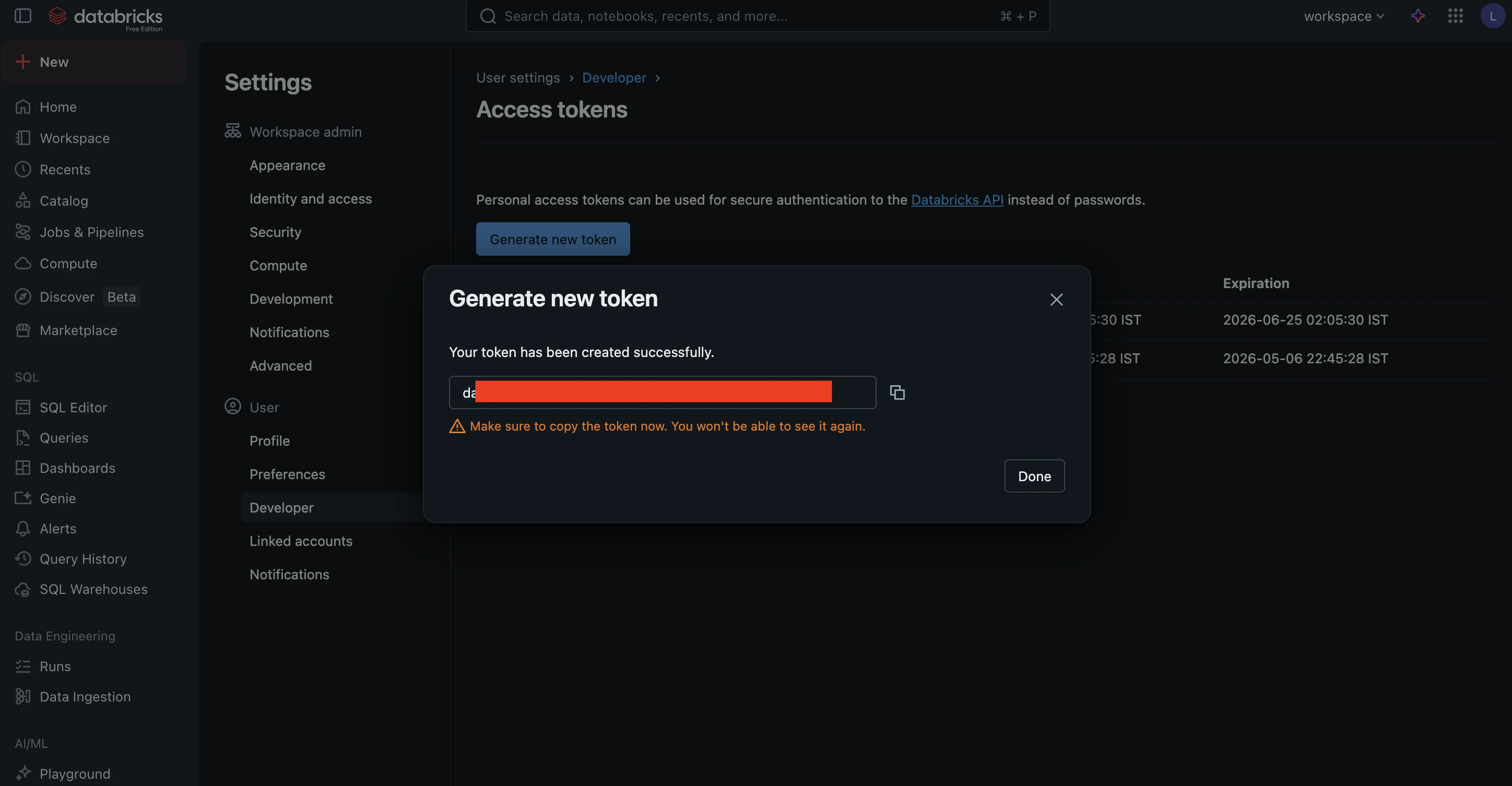
- Your Base URL is the workspace URL you used to log in (e.g.,
https://<workspace-id>.azuredatabricks.net).
Actions and triggers
In Refold, you can create orchestrations of your use-cases using Databricks actions and triggers. Following are the set of Databricks actions and triggers supported by Refold.- Actions
- Triggers
Catalogs
Catalogs
- Query Catalogs - Gets an array of catalogs in the metastore in Databricks.
- Create Catalog - Creates a new catalog instance in the parent metastore in Databricks.
- Retrieve Catalog - Gets the specified catalog in a metastore in Databricks.
- Update Catalog - Updates the catalog that matches the supplied name in Databricks.
- Delete Catalog - Deletes the catalog that matches the supplied name in Databricks.
Clusters
Clusters
- Create Cluster - Create a new cluster in Databricks.
- List Clusters - List all pinned and active clusters in Databricks.
- Get Cluster Info - Get information about a specific cluster in Databricks.
- Query Clusters - Return information about all pinned, active, and recently terminated clusters in Databricks.
- Start Cluster - Start a terminated cluster in Databricks.
- Restart Cluster - Restart a running cluster in Databricks.
- Terminate Cluster - Terminate a cluster in Databricks.
- Delete Cluster - Permanently terminates a cluster and removes it asynchronously in Databricks.
Groups
Groups
- List Groups - Get all group details in Databricks.
- Create Group - Create a new group in Databricks.
- Update Group - Update group details in Databricks.
- Delete Group - Delete a group in Databricks.
Jobs
Jobs
- Create Job - Create a new job in Databricks.
- Query Jobs - Retrieves a list of jobs in Databricks.
- Show Job - Retrieves the details for a single job in Databricks.
- Update Job - Add, update, or remove specific settings of an existing job in Databricks.
- Delete Job - Delete a job in Databricks.
- Run Job - Run a job and return the run ID of the triggered run in Databricks.
- Get Job Run - Retrieves the metadata of a run in Databricks.
- Cancel Run - Cancels a job run or a task run asynchronously in Databricks.
Schemas
Schemas
- Query Schemas - Gets an array of schemas for a catalog in the metastore in Databricks.
- Create Schema - Creates a new schema for a catalog in the metastore in Databricks.
- Retrieve Schema - Gets the specified schema within the metastore in Databricks.
- Update Schema - Updates a schema for a catalog in Databricks.
- Delete Schema - Deletes the specified schema from the parent catalog in Databricks.
SQL Statements
SQL Statements
- Execute Statement - Execute a SQL statement and optionally await its results in Databricks.
- Retrieve Statement - Poll for the status and results of a SQL statement execution in Databricks.
- Retrieve Statement Result Chunk - Fetch a paginated chunk of results from a completed SQL statement in Databricks.
- Cancel Statement Execution - Request that an executing SQL statement be canceled in Databricks.
Tables
Tables
- Query Tables - Gets an array of all tables for a catalog and schema in the metastore in Databricks.
- Retrieve Table - Gets a table from the metastore for a specific catalog and schema in Databricks.
- Check Table Exists - Checks if a table exists in the metastore for a specific catalog and schema in Databricks.
- Query Table Summaries - Gets an array of summaries for tables under a schema and catalog in Databricks.
- Delete Table - Deletes a table from the specified parent catalog and schema in Databricks.
Users
Users
- List Users - Get details for all users in Databricks.
- Create User - Create a new user in Databricks.
- Get User - Get user details by ID in Databricks.
- Update User - Update an existing user in Databricks.
- Delete User - Delete a user in Databricks.
Volumes
Volumes
- Query Volumes - Gets an array of volumes for a catalog and schema in the metastore in Databricks.
- Create Volume - Creates a new volume in Databricks.
- Retrieve Volume - Gets a volume from the metastore for a specific catalog and schema in Databricks.
- Update Volume - Updates the specified volume in Databricks.
- Delete Volume - Deletes a volume from the specified parent catalog and schema in Databricks.
Warehouses
Warehouses
- Query Warehouses - Lists all SQL warehouses that a user has manager permissions on in Databricks.
- Create Warehouse - Creates a new SQL warehouse in Databricks.
- Retrieve Warehouse - Gets the information for a single SQL warehouse in Databricks.
- Update Warehouse - Updates the configuration for a SQL warehouse in Databricks.
- Start Warehouse - Starts a SQL warehouse in Databricks.
- Stop Warehouse - Stops a SQL warehouse in Databricks.
- Delete Warehouse - Deletes a SQL warehouse in Databricks.
Workspace
Workspace
- Import Workspace - Import a workspace object (notebook or file) or the contents of an entire directory in Databricks.
- Export Workspace - Export a workspace object or the contents of an entire directory in Databricks.
- List Workspace - List the contents of a directory in Databricks.
- Retrieve Object Status - Gets the status of an object or directory in Databricks.
- Delete Workspace - Deletes an object or a directory in Databricks.
- Query Directories - Lists the contents of a directory, or the object if it is not a directory in Databricks.
- Create Directory - Creates the specified directory and any necessary parent directories in Databricks.
Others
Others
- HTTP Request - Make HTTP API calls to any Databricks documented REST APIs.
- Incremental Sync - Check for new data in the endpoint.